Chocolate Hills Map
- 14-12-2025, 09:01
- 524
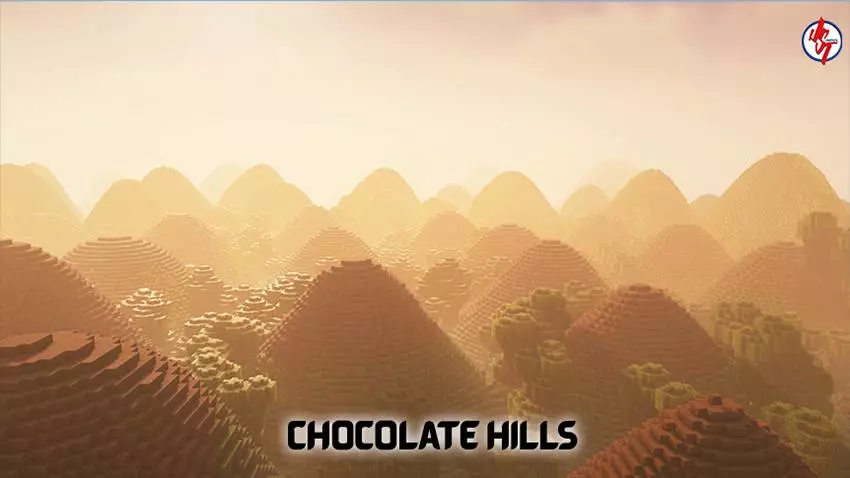
Chocolate Hills Map — a real-world landscape build that drops you into a sea of rounded grassy hills inspired by Bohol’s famous geological formation.
Chocolate Hills Map is all about scale and repetition in the best way: you’re surrounded by dozens and dozens of smooth, dome-shaped hills that stretch out like waves. The real Chocolate Hills are in the Bohol province of the Philippines, and they’re known for having at least 1,260 hills, with estimates going as high as 1,776 spread across more than 50 square kilometers. That “so many you can’t count them” feeling is exactly what makes this place special in Minecraft Bedrock too. You’re not just looking at one cool mountain or one fancy structure; you’re walking through a whole region that feels weirdly natural, like the world generator got obsessed with one perfect hill shape and kept remixing it forever.
Gameplay-wise, Chocolate Hills Map is perfect if you like exploration that’s more about vibes and navigation than combat. Every hill is a mini climb, and the payoff is always another wide view that makes you want to pick a direction and keep going. It’s a great map for chill survival starts because the terrain naturally creates little sheltered dips for camps, plus tons of high points for lookout builds. If you’re playing with friends on a Realm or server, this is a clean “let’s split up and meet on the tallest hill” kind of world. It also works for roleplay or travel-style sessions where you’re just taking screenshots, riding around, and making the landscape feel lived-in with paths, signs, and small outposts.
The coolest real-life detail is the color shift: the hills are covered in green grass that turns brown during the dry season, which is why they’re called “Chocolate” Hills. In Minecraft Bedrock, Chocolate Hills Map gives you an easy way to recreate that same seasonal mood depending on how you like to play. Keep it lush and green for that fresh, alive look, or lean into the “dry season” vibe by styling your builds with warmer tones and letting the hills feel dusty and sunbaked. Either way, the map stays super flexible: you can treat it like a natural wonder you’re touring, or turn it into your personal base region where every hill becomes a marker for farms, storage, and scenic lookout spots. If you want a terrain-first map that feels instantly recognizable and looks wild from literally any angle, Chocolate Hills Map is the kind of place you’ll keep coming back to just to stand on a peak and take it all in.
How to install?
Android: use ES Explorer to find mcworld in the download folder. Click on a file to import it inside.
Versions of Windows 10: Go to your downloads folder and find mcworld. Click on the document to add it to the client.
IOS: as soon as they clicked on the Download button below, the device will offer to open it.
Comments (0)