Clean UI Addon
- 18-01-2026, 12:04
- 539
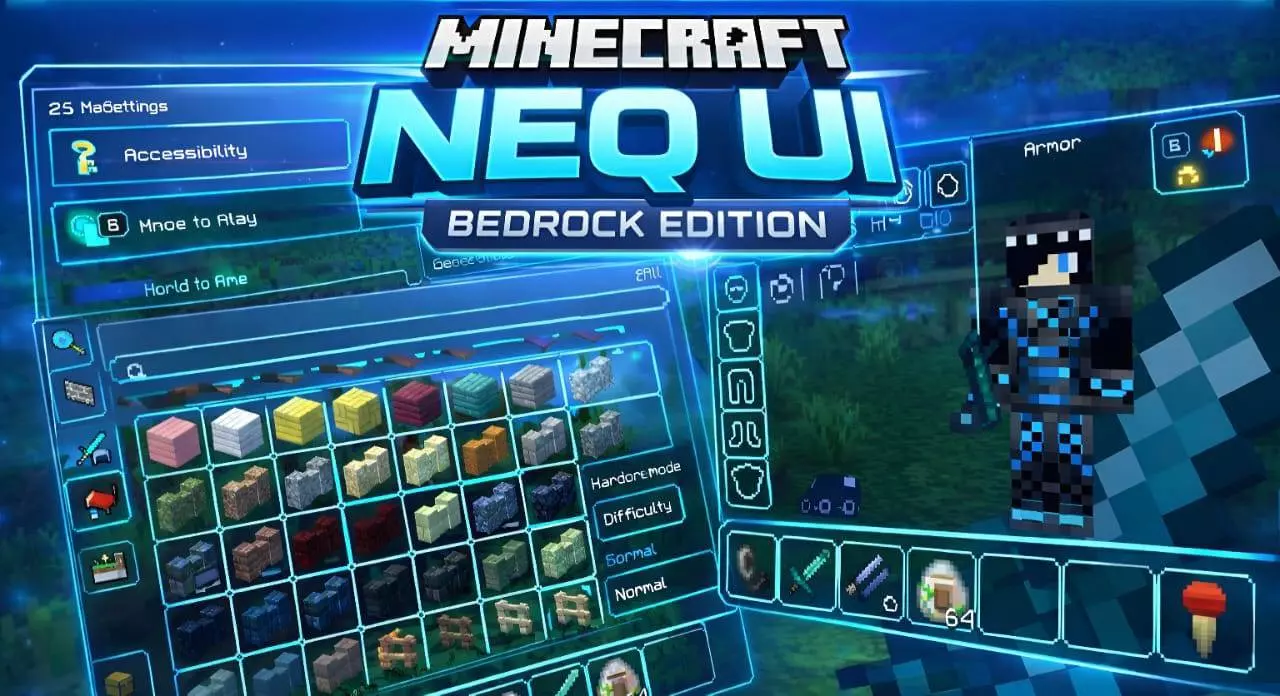
Clean UI Mod — a NEQ UI-style overhaul that cleans up your HUD and menus so the world stays front and center instead of getting buried under chunky screens.
Clean UI Mod is basically a full interface refresh built around one idea: stop letting the UI fight your gameplay. It takes the NEQ UI approach and strips away the extra visual noise so everything feels cleaner, sleeker, and easier to read at a glance. Instead of big, clunky panels hogging your screen, the layout aims for a modern, minimalist look that keeps distractions low and makes the game feel smoother to navigate. The vibe isn’t “change Minecraft into something else,” it’s more like polishing what’s already there so your eyes aren’t constantly bouncing between bulky menus and your build.
In real play, the biggest difference is how natural everything feels when you’re swapping between action and menus. You’re always opening your inventory, checking settings, moving items around, crafting, and bouncing through screens, especially in survival where you’re juggling tools, food, and loot nonstop. Clean UI Mod is meant to make those moments faster and less annoying by keeping the interface streamlined and clear. The result is a HUD and menu style that feels less crowded, so you can focus on what’s happening in the world instead of squinting through clutter. If you’re the kind of player who spends hours building, the “clean screen” effect is even more noticeable because the UI stops stealing attention from your shapes, colors, and lighting.
Clean UI Mod also fits a bunch of different play styles without forcing you into a specific vibe. Creative players get a tidier workspace for long build sessions, while survival players get a cleaner flow for inventory management and quick decision-making. It’s also the kind of UI change that helps when you’re trying to stay locked in during tense moments, because the interface is designed for clarity instead of noise. The pack description calls it optimized for speed and readability, and that’s exactly what you want from a UI overhaul: menus that feel snappy, information that’s easier to scan, and a general look that feels modern instead of dated. If you like the NEQ UI concept and you want Minecraft Bedrock to feel cleaner and more intuitive without adding extra gameplay mechanics, Clean UI Mod is a straight visual quality-of-life win.
Installation:
— Download McPack
— Install McAddon or McPack files, just open it for this;
— Select new textures in the settings;
— Done.
Comments (0)