Indexer Addon
- 23-01-2026, 15:01
- 642

Indexer Mod — a pipe-based storage network that links your chests into one searchable system, letting you dump items fast and pull anything back instantly with a clean UI.
Indexer Mod is for anyone who’s tired of the “which chest did I put that in?” mini-game that eats half your survival sessions. Instead of messing with complicated Redstone sorting lines, hoppers everywhere, or building a laggy item elevator, this add-on gives you a straight-up storage network built around pipes and a central brain called the Indexer Controller. Think of the Controller like the system’s CPU: every pipe line in your setup needs to connect back to it, and once that’s done, your whole storage room starts acting like one organized inventory instead of fifty random boxes.
Setting it up stays pretty simple. You place the Indexer Controller first, then run pipes out from it like you’re laying wiring through your base. Any container you want in the network—chests, barrels, even furnaces—gets attached through a Connector block. The Connector gives you a clear visual status too: the top turns pink when it’s connected and black when it’s disconnected, so you can troubleshoot fast without guessing which part of your system is broken. That tiny detail matters in survival builds, because you don’t want to spend an hour hunting one missing link when you’re just trying to store loot after a long mining run.
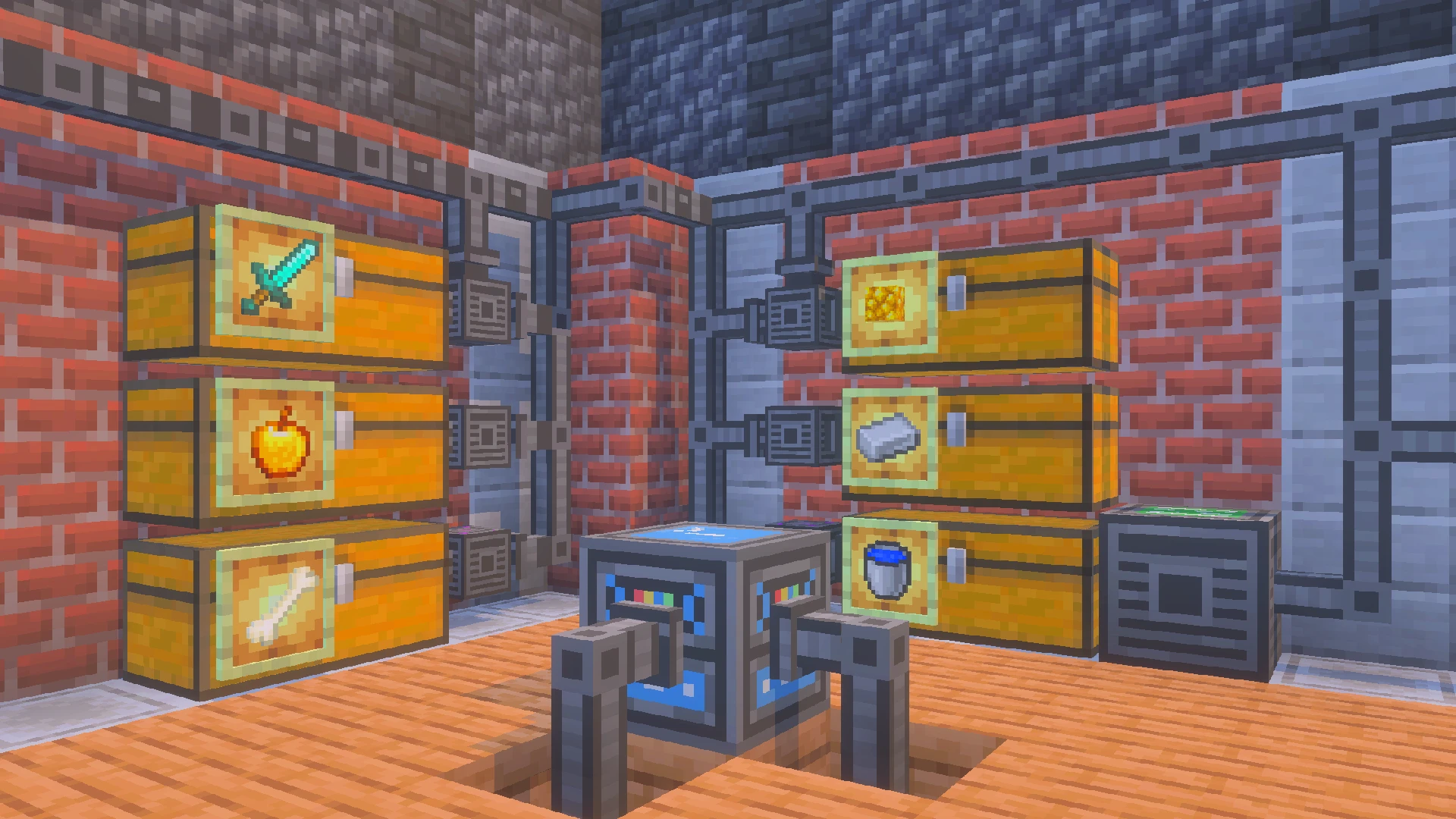
The mod really comes alive with its two interface blocks. The Block Indexer Dropbox is your input side, and it’s basically the “dump your stuff and go” station. Click it while holding an item and you can store as much of that item as you want into your connected chests, with automatic sorting handled by the system. Click it with an empty hand and it can deposit your entire inventory at once (excluding armor slots), which is perfect after caving, raiding, or just cleaning your hotbar after a project. It turns that annoying post-adventure chest spam into one quick action.
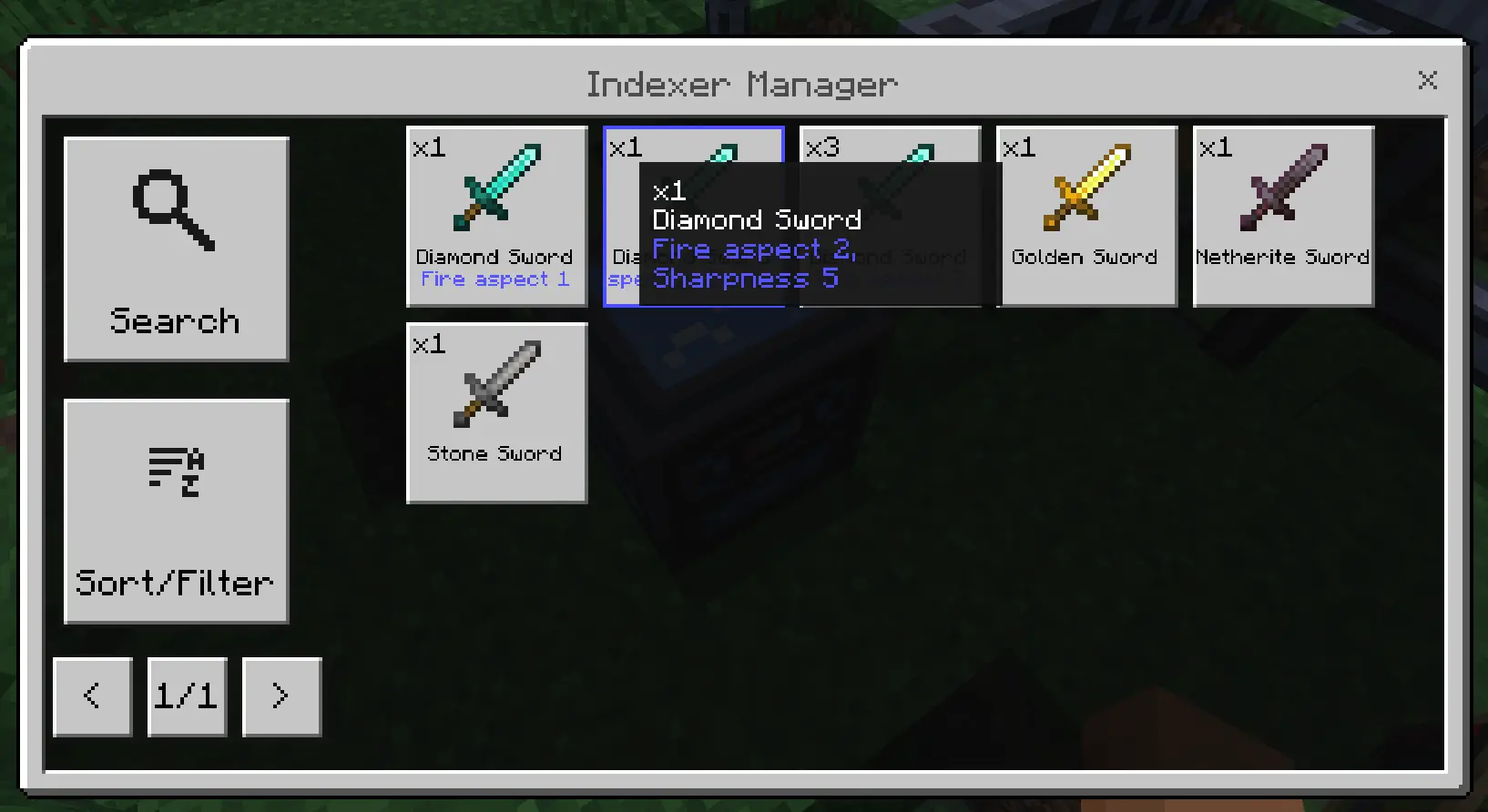
The Block Indexer Manager is the output side, and this is the part that feels like cheating—in a good way. Clicking it opens a UI that lists everything stored across the entire network. You can search by item name, or sort the list by quantity or alphabetically, so finding one specific block doesn’t require opening ten double chests and panic-scrolling. It also handles enchanted items in a smart way: enchanted gear only stacks if the enchantments match exactly, otherwise they show up as separate entries, which keeps your storage accurate instead of mashing different tools together. And if you need to check what’s actually on an enchanted book or tool, you can hover over it to see the full enchantment list right there in the Manager interface.
One important limitation to keep in mind is chunk loading. The Indexer system can only access chests or containers inside loaded chunks, so if you spread storage across far-off bases, you won’t magically pull items from an unloaded area. But for a main base storage room—especially in Minecraft Bedrock/MCPE survival—Indexer Mod is a massive upgrade: quick deposit, instant search, clean organization, and way less time wasted staring at rows of chests.
Installation:
— Download McPack
— Install McAddon or McPack files, just open it for this;
— Select new textures in the settings;
— Done.
Comments (0)